Two ways to create agent modules#
TantoC2 supports two formats for declaring agent modules:
| Format | When to use |
|---|---|
Python wheel package with AgentModuleBase | New modules — preferred. Bundled as a proper Python package with entry points, payload as package data, schemas as class attributes. |
| YAML manifest + payload file | Simple or legacy modules. Drop a directory with manifest.yaml and the payload file into an agent_modules/ directory. |
Both formats are discovered by the AgentModuleRegistry at startup and exposed identically to operators.
Python Wheel Package (Preferred)#
Overview#
An AgentModuleBase subclass declares module metadata and command schemas as class attributes, bundles the payload as package data, and exposes itself via an entry point.
| |
__init_subclass__ scans for Command class attributes and populates _discovered_commands. The payload is located at runtime via importlib.resources.
Step 1: Create the project structure#
| |
Step 2: Write pyproject.toml#
| |
Step 3: Implement AgentModuleBase#
| |
The payload file sysinfo.py is bundled as package data and located at runtime via importlib.resources.
Step 4: Write the payload#
For format: py, the payload must export a run(options) function:
| |
Reference implementation#
Source: tantoc2/src/tantoc2/server/agent_modules/sysinfo/__init__.py
| |
YAML Manifest + Payload File (Legacy/Simple)#
Lifecycle Overview#
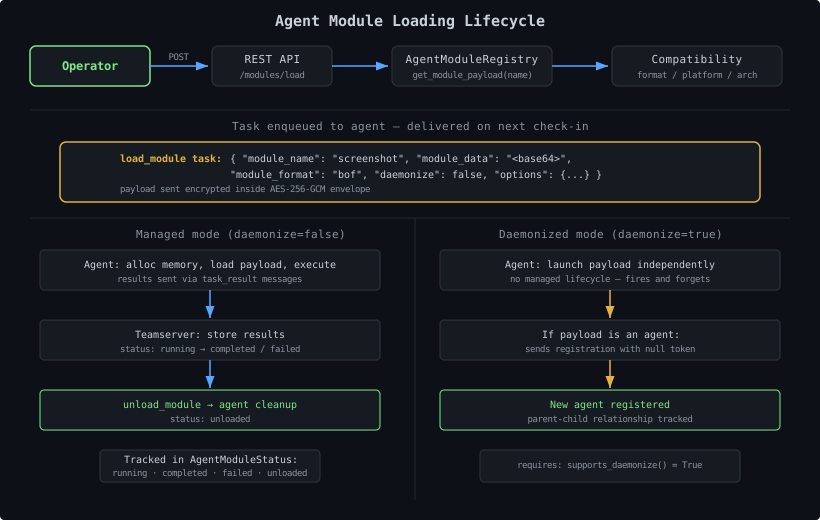
- Create a compiled payload in a format your target agent supports
- Write a
manifest.yamldescribing the payload’s metadata and options - Place both in a subdirectory under
agent_modules/ - The
AgentModuleRegistrydiscovers and validates the manifest on startup - Operators select compatible modules for a specific agent
- The teamserver sends a
load_moduletask with the base64-encoded payload - The agent receives the payload and executes it in managed or daemonized mode
Step 1: Write your payload#
Create the compiled payload in whatever format your target agent supports. Common formats:
format value | Extension | Description |
|---|---|---|
bof | .o | Beacon Object File (COFF object) |
shellcode | .bin | Position-independent shellcode |
dll | .dll | Windows DLL with a specific export |
coff | .o | COFF object file |
py | .py | Python script (for the Bokken agent) |
Any string works as a format identifier. The teamserver matches format against what the target agent declares in supported_module_formats(). A module will only appear in the compatible list if the format matches.
Step 2: Write manifest.yaml#
Create manifest.yaml in the same directory as your payload:
| |
Manifest Reference#
Required Fields#
| Field | Type | Description |
|---|---|---|
name | str | Unique module name. Must be globally unique across all agent modules. |
description | str | Human-readable description shown in the UI and CLI. |
author | str | Author name. |
format | str | Format identifier — must exactly match a value in the target agent’s supported_module_formats(). |
Optional Fields#
| Field | Type | Default | Description |
|---|---|---|---|
platforms | list[str] | [] | Target platforms: windows, linux, macos. Empty = all platforms. |
architectures | list[str] | [] | Target architectures: x64, x86, arm64, any. Empty = all arches. any matches all. |
version | str | "1.0.0" | Module version string. |
privilege_required | bool | str | false | Whether elevated privileges are needed. |
mitre_attack | list[str] | [] | MITRE ATT&CK technique IDs. |
payload_file | str | auto-detect | Filename of the payload relative to the module directory. If omitted, the registry picks the first non-YAML file in the directory. |
options_schema | dict | {} | Options operators can pass when loading the module (see below). |
options_schema Format#
Each key in options_schema is an option name. The value is a dict with these fields:
| |
The registry automatically converts your options_schema to a Command via Command.from_options_schema(). When a module is running inside an agent, its schema is merged into the capabilities endpoint response so the CLI agent shell and the web UI Tasks tab can render the correct input form and offer tab-completion.
Note: positional and entity-type arguments are not available in manifest YAML. Use AgentModuleBase if you need those features.
See Declaring Command Schemas for the full type reference.
Step 3: Directory Layout#
Place your module in a subdirectory of agent_modules/:
| |
Each subdirectory must contain a manifest.yaml (or manifest.yml). The registry scans all subdirectories recursively.
Compatibility Filtering#
The AgentModuleRegistry uses AgentModuleDescriptor.is_compatible() to match modules to agents on three dimensions:
| |
An empty platforms or architectures list in the manifest means “all” — the filter is skipped. any in architectures matches every agent architecture.
Loading Modes#
Managed Mode (default, daemonize=false)#
The agent:
- Allocates memory and loads the payload
- Executes it synchronously
- Returns results through its C2 channel as
task_resultmessages - Tracks the module lifecycle (running, completed, failed)
- Supports clean unload via an
unload_moduletask
Managed mode is the default. Long-running modules can stream results across multiple check-in cycles.
Daemonized Mode (daemonize=true)#
The agent:
- Launches the payload independently (does not wait for results)
- Loses the managed lifecycle — there is no
unload_module
If the payload is a C2 agent itself (e.g., Shinobi shellcode), it:
- Performs its own registration handshake with the teamserver
- Registers as a brand-new agent
- The teamserver records the parent-child relationship for P2P topology
Requires the loading agent to declare supports_daemonize() = True.
Task Payloads#
The teamserver sends these task types when managing agent modules.
load_module#
| |
unload_module#
| |
The agent handles these task types as declared in its built-in command list.
Module Status Tracking#
The teamserver tracks each loaded module per agent:
| Status | Meaning |
|---|---|
running | Module is loaded and executing |
completed | Module finished normally |
failed | Module execution failed |
unloaded | Module was cleanly unloaded by operator |
Python Modules for the Bokken Agent#
The Bokken agent supports format: py. Python modules must export a run(options) function:
| |
Reference: Bokken Bundled Modules#
Bokken ships two bundled Python modules at bokken/src/tantoc2_bokken/:
| Module | Format | Description |
|---|---|---|
sysinfo | py | Collect system information (OS, hostname, interfaces) |
exec | py | Execute a shell command and return output |
These modules use YAML manifests and serve as working examples of the manifest format. The hello_world and port_check modules were removed in the pre-Stage 5 cleanup.
For the preferred Python wheel package approach, see the server-bundled reference at tantoc2/src/tantoc2/server/agent_modules/sysinfo/__init__.py.
tantoc2.agent_modules entry points) or from the agent_modules/ directory. Bokken’s bundled modules are provided by the Bokken package, not the teamserver.Bundling Modules with an Agent Package#
Agent packages can ship bundled modules via agent_modules_dir():
| |
The AgentModuleRegistry.discover_from_packages() call at startup scans all registered agent packages and adds their module directories automatically.
Discovery and Refresh#
| |
refresh() on the AgentModuleRegistry re-scans all directories — equivalent to a full discover(). Add new modules by dropping them in agent_modules/ and calling refresh.
Common Pitfalls#
Format mismatch — the format field must exactly match a string in the agent’s supported_module_formats(). Typos here mean the module never appears as compatible.
Missing any in architectures — if you have a universal payload (e.g., Python script), set architectures: [any] in your manifest or architectures = ["any"] in your class. Without this, an agent with arch x64 won’t match a manifest that lists only x86.
payload_file path — the value is relative to the module directory (for manifests) or the package (for wheel packages). Do not include the directory name itself.
Empty platforms/architectures — an empty list means “all” (no filter). If you only target Windows but leave platforms: [], the module will appear as compatible for Linux agents too.
Duplicate names — if two module directories have the same name, the second one is silently skipped. Module names must be globally unique.